Skip to content

NMS2S inventory, label designer and tools.

Waputu mirrors your NMS2S inventory, builds labels from your NMS2S data (a lot’s first label prints from Inventory or from a manifest, and reprints can use a saved or built-in design), and builds nutrition facts for edibles from the ingredients your team enters.

Your inventory, mirrored.

Waputu mirrors your NMS2S inventory: lots, rooms, potency and event history.

Every lot in your NMS2S inventory.

The rooms those lots are in.

The potency NMS2S records for each lot.

The event history NMS2S records for each lot.

Manufacturing, extraction and cultivation facilities refresh more often than retail ones, because lots there change more often.

Built for retail, manufacturing and cultivation.

Whichever kind of New Mexico cannabis license you hold, Waputu follows the lots your facility holds in NMS2S.

Retail and dispensaries

A clear record of what is on your shelves and in your stock room. Retail facilities sync less often than manufacturing ones.

  • Every lot with its room, quantity and potency as NMS2S records them.
  • Find any lot by product or barcode.
  • Aging and expiry for everything you hold, so you can see what is getting old.
  • A lab results page for each lot, showing the potency NMS2S records and what your team enters.
Manufacturing and extraction

The work between harvest and shelf, with each action on an existing lot checked against a fresh NMS2S read before it is sent.

  • Conversions offered only when the lot’s own NMS2S record lists them; splits, merges and moves checked against a fresh NMS2S read before they are sent.
  • Labels built from each lot’s NMS2S data, and nutrition facts for edibles built from your ingredients.
  • Destruction scheduled, cancelled and finalized with every step recorded.
  • Transfer manifests built, finalized and printed as PDFs.

Cultivation facilities

The lots your cultivation facility holds, with the rooms they sit in, refreshed as often as a manufacturing facility’s.

  • Every lot’s room, quantity and event history as NMS2S records them.
  • Manifests that send lots on to manufacturers and stores.
  • Aging and expiry across everything you hold.
  • Destruction scheduled and finalized with a recorded trail.

Manufacturing tools that act in NMS2S.

Conversions, splits, merges, moves, adjustments, destruction, manifests, receiving, restores and undo, as tools that send the action to NMS2S for you.

Run manufacturing conversions.

Split a lot.

Merge lots.

Move lots.

Adjust a quantity.

Handle destruction.

Work with manifests.

Receive incoming manifests.

Restore a lot.

Undo a packaging or deli-style step.

Nothing is sent to NMS2S until your company’s administrator switches state changes on. Every action on an existing lot or manifest is checked against a fresh NMS2S read before it is sent, every attempt sent to NMS2S is recorded first, and an action with an unclear answer is never sent again automatically.

How a change reaches NMS2S.

Every Waputu tool that changes NMS2S follows the same steps.

  • Nothing is sent to NMS2S until your company’s administrator switches state changes on.

  • Every action on an existing lot or manifest is checked against a fresh NMS2S read before it is sent.

  • Every attempt sent to NMS2S is recorded first. It keeps what was asked, who asked and what NMS2S answered.

  • An action with an unclear answer is never sent again automatically. It is shown as unknown.

  • Some actions cannot be undone, including destruction, adjustments to zero and finalized manifests.

Every change sent to NMS2S is made in your name and on your license. See how each change is protected.

Manufacturing conversions.

Waputu offers a conversion only when the lot’s own NMS2S record lists it, and builds the request from that record.

Conversions run from crude and distillate to cartridges and infused products.

Transfers and manifests.

Build, update, finalize and void outgoing manifests, and receive incoming ones.

Print any transfer manifest as a PDF. It is read from NMS2S when you print it.

Destruction, one recorded step at a time.

Schedule a lot for destruction, cancel it, or finalize it. Every step is recorded.

A destruction page lists the lots scheduled, destroyed and cancelled through Waputu.

Aging and expiry.

See how old every lot is and when it expires.

The aging page shows how many lots have expired, how many expire in the next thirty days, the average age of your stock and where the oldest lot sits.

Search by product or barcode, sort by age or by expiry, filter by product type and export the list.

Labels and nutrition facts.

Waputu builds each label from the lot’s NMS2S data. A lot’s first label prints from Inventory or from a manifest, and reprints can use a saved or built-in design. Nutrition facts for edibles are built from the ingredients your team enters.

A lot’s first label prints from Inventory or from a manifest, through your browser’s print dialog.

Nutrition facts for edibles, built from the ingredients your team enters (with USDA nutrient data), shown on the lot’s lab results page and in its PDF.

Align a field, switch design

Design the label

Your company’s administrator designs labels in Waputu: pick a label size, switch fields on or off, and drag each one into place.

Start from a 2 x 1 inch roll, a 4 x 2 inch roll or a letter sheet of 30 labels, or enter your own size in inches or millimetres. Save the design and make it your default.

Print with a design

Reprint it as a PDF

Pick lots that already have a label on record, pick a design, choose how many copies. Waputu builds one PDF at the exact size of your label stock and opens it in a new browser tab. You print it from there. A lot’s first label prints from Inventory or from a manifest.

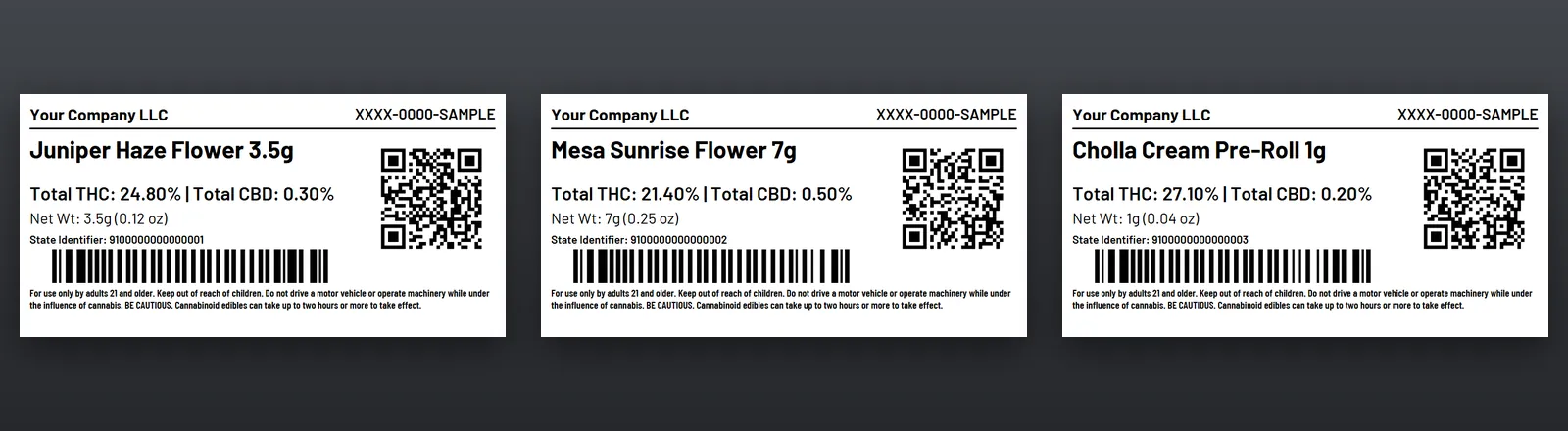
Three 4 by 2 inch labels side by side, each with a manufacturer line, product name, Total THC and CBD, net weight, state identifier, a QR code, a barcode and a warning statement.

The PDF: 4 x 2 inch roll

Every product screen on this page shows made-up sample data, not a real company’s records.

Your team reviews every label before it is used.

Designing is for your company’s administrator. Anyone signed in can reprint a lot’s label with a saved or built-in design.

  • Potency prints as a percentage for inhaled products and in milligrams for edibles and topicals.

  • A label’s QR code opens the lot’s public lab results page.

  • Give a lot a name your team uses without changing the name NMS2S holds. Both names stay visible.

A public lab results page per lot.

Each lot gets a public lab results page. It shows the potency NMS2S records for the lot.

  • It is not the laboratory’s own certificate of analysis.

Made for New Mexico.

Waputu is built for licensed cannabis businesses across New Mexico, from Albuquerque and Santa Fe to Las Cruces, Rio Rancho, Roswell and Farmington.

One private install per company.

Each company gets a separate database for its operating records, and its own site.

For you, this means no other company’s records sit beside yours, so they cannot turn up in your inventory through a shared table. Read why a separate database matters.

Questions about the features.

What is NMS2S?

NMS2S is New Mexico’s cannabis traceability system, operated by or for the Cannabis Control Division. Licensees record their inventory and transfers in it.

Does Waputu send changes to NMS2S?

Only the actions your staff choose, and only after your company’s administrator switches state changes on. Every action on an existing lot or manifest is checked against a fresh NMS2S read before it is sent. Every attempt sent to NMS2S is recorded first.

Which conversions can I run?

Whichever conversions NMS2S lists for the lot. Waputu offers a conversion only when the lot’s own record allows it.

Do I need to install anything?

No. Waputu runs in your web browser. A lot’s first label prints through the browser’s print dialog, and reprints with a saved or built-in design open as a PDF in a new tab.

Does it work for retail stores?

Yes. Retail facilities get the same mirror, aging views and lab results pages, and sync a little less often than manufacturing ones.

Who is responsible for compliance?

Your business is responsible for its own compliance, and for reviewing every label, nutrition facts panel, manifest and public page before it is used.

Requesting access is not a contract. Raiden may approve or reject any request.

Request access