
Find the right inventory
Search by barcode or product. Keep the facility and unit of measure clear, with source freshness beside the work.
Create NMS2S sublots and print organized product labels in one workspace. Built for New Mexico cannabis teams.
Private workspaces / No payment card during launch
| Product and lot | Available | Status |
|---|---|---|
| Example flower 3.5 gSAMPLE-1001 | 120 units | Ready |
| Example extract 1 gSAMPLE-1002 | 80 units | Needs details |
| Example bulk flowerSAMPLE-1003 | 1,000 g | Ready |
| Example flower 7 gSAMPLE-1004 | 48 units | Ready |
| Example pre-roll 1 gSAMPLE-1005 | 200 units | Ready |
Keep every lot together.

 Sample layout · Not for packaging
Find inventory, review sublots and prepare grouped labels in one workspace.
Search by product or barcode in the right facility.
Check quantities and confirm the returned children.
Keep every product label in its own lot group.
Less hunting through menus. The dashboard puts inventory, unfinished jobs and missing label details on the same desk.
Search by barcode or product. Keep the facility and unit of measure clear, with source freshness beside the work.
See label drafts and sublot jobs that need review. A partial or unknown state outcome gets attention before more work is sent.
Connect a parent lot, its confirmed children and their label versions. Keep local product details distinct from state facts.
Choose your dimensions, your printer and each lot QR destination. Keep required content and legibility checks built into the process.
See a 500-label job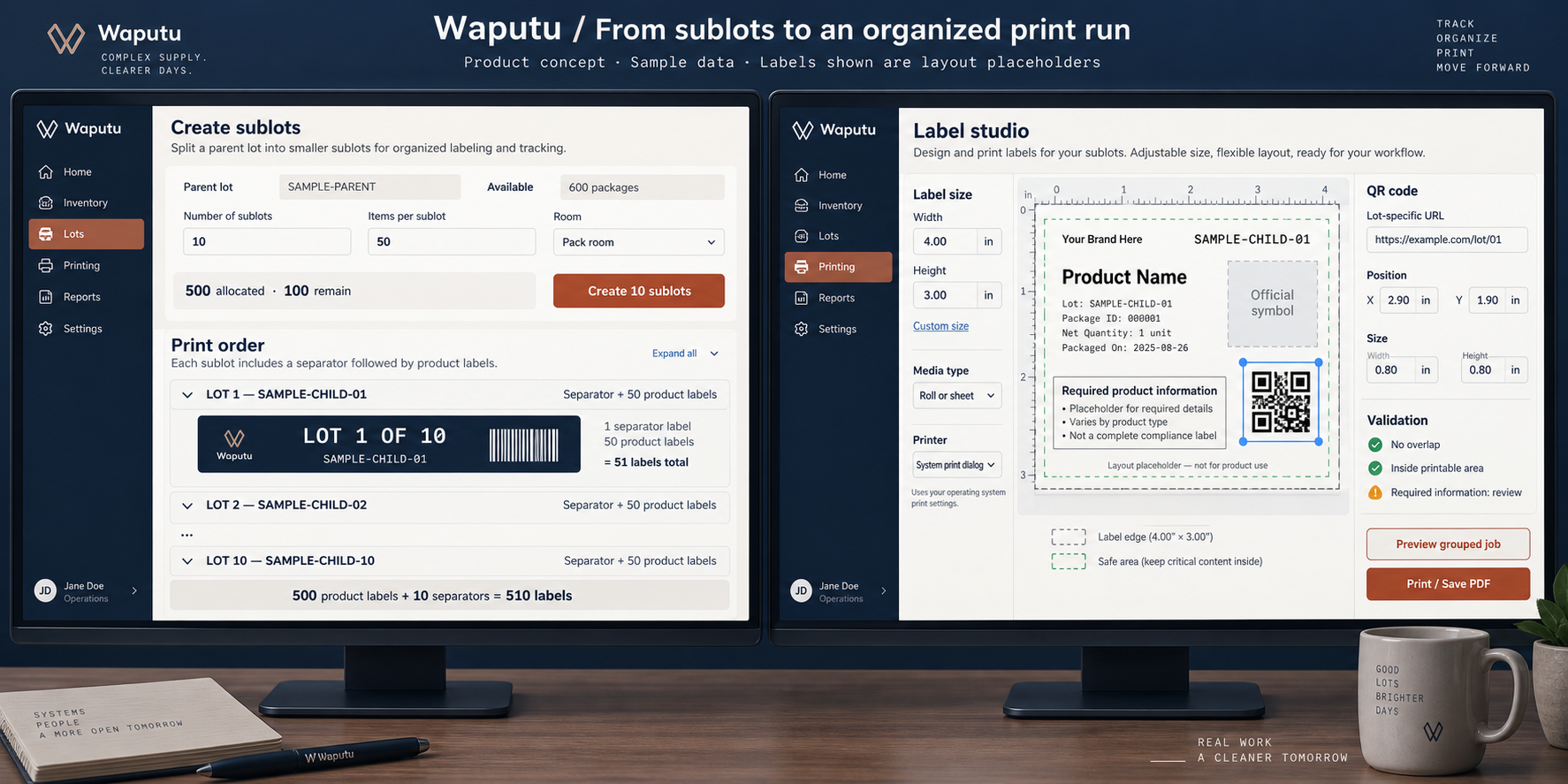
A separator before every lot. The correct barcode and QR on every product label. An ordered PDF that keeps your team oriented.
500 product labels + 10 separators
= 510 label positions
Continue in lot order through Lot 10
Sample sequence. Separators are internal and do not go on sale packaging.
Existing lots can go straight to labels. When you need children, create and verify them first, then prepare their labels.
Find inventory by product or barcode. Keep facility, quantity, source data and freshness in view.
Plan child lots, check quantities and the parent remainder, then confirm. Keep each returned state barcode.
Choose your stock size, review product facts and set the QR link for each lot. Resolve missing details before output.
Prepare one ordered PDF with lot separators. Reprint from the recorded job without creating another sublot.
New Mexico label checks use published, adopted requirements. Proposed changes do not become active rules.
Missing facts, unreadable layouts and unreviewed required-information links must be resolved before production output.
State outcomes, label preparation and operator print confirmation are separate records. Opening a print dialog is not proof of a printed label.
Connect your authorized state account, review inventory in the right facility, and keep confirmed child identifiers attached to the work. Waputu brings sublot review and label preparation into one daily routine.
Use protected setup, verify your facilities and check source freshness before relying on a record.
Read the connection guideReview quantities before a split. If a result is unknown, reconcile the existing job before more work is sent.
Understand the integrationUse confirmed identifiers for label groups. Reprint saved output without creating another state child.
Explore the labeling workflowNMS2S is the New Mexico state tracking platform. Waputu brings the working sequence around a lot into focus: review it, create the intended children, then prepare their labels.
See how they work togetherYour authorized state account supplies the facility and inventory context. Returned child identifiers stay attached to the job.
Review split quantities, reconcile uncertain outcomes and produce an ordered PDF. Local product facts and saved print jobs remain part of the workspace.
Sublot creation is the only NMS2S business write in Waputu. Official state platform resources
Start with the work you need to get done. Keep facility access, label preparation and handoffs deliberate as your operation grows.
Connect your facility, prepare product facts and establish a repeatable label workflow on your own printer.
Give people a clear place to work. Invite staff, review access and preserve the handoff from inventory to print.
Keep the facility visible while organizing a shared process. Review the current plans against your actual operating needs.
Search a specific task, follow a setup guide or take a deeper look at the operating process. Start with the question in front of you.
Search the support centerThe label engine uses exact-size PDFs and your normal printer driver. Set custom dimensions in millimeters for roll or sheet stock. Your printer must support the chosen stock, printable area and required color. Calibration and a physical proof are part of setup.
Ten lots with 50 items each produce 500 product labels plus 10 clearly marked lot separators. Each separator comes before its lot labels. Every product label retains its own lot identifier. Sheet printing starts each lot on a new sheet by default.
Yes. Set a public web link per lot, then set the QR position and size with exact measurements. Required-information links need a content review; an extra marketing link cannot replace required label information.
The label checks follow published, adopted New Mexico requirements at their effective dates. Proposed rules stay out of active checks. Release requires verified product data, a reviewed template and a physical packaging proof. Software checks alone do not certify a product.
Sublot creation is the only state business write. Other supported records are read for context and traceability. Label designs, QR settings and print history are managed in your workspace. Reprinting never resubmits a split.
Initial launch access is free, with no payment card required. Any future paid plan will require your agreement before billing begins.
Register through the signup portal and verify your email to prepare a private workspace. Existing invited users can sign in to their workspace. Launch access does not require a payment card. The illustrations on this page use sample data.
Start your workspace. Connect your inventory. Keep every lot together.